undefined
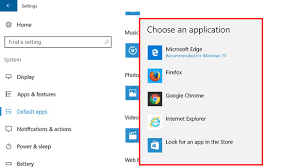
Have you recently installed a new browser and accidentally changed your default browser settings while installing it? Or do you wish to switch your default browser to any other browser of your choice? Well doing so is very simple and it can be done in a few minutes.
Windows 10 comes with a pre-installed Microsoft Edge browser, which launches automatically when you click on shortcuts, email links or on to any URL. But if you prefer any other browser like Chrome, Mozilla Firefox, etc, then you may wish to set that browser as default. Or if while installing you set it as default browser and want to switch back to the previous one, you can do so by changing the default browser settings.

John Smith 發表在 痞客邦 留言(0) 人氣()

undefined

Finally, SoundCloud has made an announcement that they will be adding their much-anticipated feature of sharing songs from your Soundcloud playlist to your Instagram Stories. The SoundCloud subscribers had been awaiting this feature for quite some time, and finally, on October, SoundCloud announced via their official blog post to add a new feature for their users.
Now it is quite simple for users of SoundCloud to share their favourite soundtracks with their friends and followers on Instagram stories. If you have created your track and want to promote it and receive feedback, using this feature can help in doing so.
You can facilitate this feature to share new and your favourite soundtracks to your followers by setting different songs to your Instagram stories and make a dynamic impact on your followers.
Steps to share songs on Instagram stories from your SoundCloud
Instagram is one of the leading social media platforms and provides a higher reach to its users, as its new feature to create Instagram Stories has provided every individual to share their stories with friends and followers on Instagram.
Various stars and celebrities prefer sharing their new music videos and pictures using this platform. It helps in ensuring that your shared music can reach a vast audience at once and instantly you can also receive feedback associated with that. You can follow the steps given below to share your SoundCloud music tracks on your Instagram stories.
  • Download the SoundCloud application from “Google Play” or “App Store”.

  • After installing the app, search for your desired track that you want to share.

  • Now spot the “Share” icon from the bottom of your screen.

  • Locate the “Instagram” option from the share options.

  • Allow the authentication and your link will be shared on Instagram.

  • That should do it; by these simple steps, you should be able to share your desired music with your Instagram followers. You can create your music community with a similar taste of music on Instagram by sharing your favourite songs and getting to know various preferences of others.
    You can also find similar features on other music apps like Spotify. In addition to this, Instagram has also introduced a new feature to add background soundtracks on your Instagram stories which avail plenty of options for users to choose from. Now by going through the steps above, hopefully, you will be able to share your favourite music tracks with your followers.

    John Smith  is a self-professed security expert; he has been making the people aware of the security threats. His passion is to write about Cybersecurity, cryptography, malware, social engineering, internet and new media. He writes for Norton security products at mcafee.com/activate

    John Smith 發表在 痞客邦 留言(0) 人氣()

    undefined
    In case your iOS device speaker is not working correctly, it is a bigger problem and more irritating problem that you might expect. Everyone likes to listen to songs by using headphones in their iOS devices, but when you hear no sound coming in your Apple device, you also can’t hear incoming calls, alert notifications for messages, the music when playing games or watching movies and many more other things in your Apple device.
                                                                                                                         

    John Smith 發表在 痞客邦 留言(0) 人氣()

    undefined
    In Microsoft Office Word it is easy to open a new or existing document and to start to write. The essential elements of different types of text include headers and footers, page numbers, equations, a bibliography, a table of contents, and an index. This method is easy to change the entire position of a single sheet or a few sheets in the document. You can add landscape position sheet, a horizontal sheet layout, into that document which uses as a portrait position, a vertical sheet layout also you can use, or vice versa.
    If you want that page in another position, add section breaks at the top, and the end of the sheet or you can choose text and permit Microsoft Word to add the new column for you.

    John Smith 發表在 痞客邦 留言(0) 人氣()

    download
    There are number of times when users are in a fix while deciding which Operating System is better. Is it Windows or Mac? Here we are going to discuss some advantages to use Windows over Mac.
    Few reasons why Windows Beats Mac:

    John Smith 發表在 痞客邦 留言(0) 人氣()

    images (11)
    Are you afraid of your kid’s accidentally running into adult content on Hulu? Well, know you may not fear so, as now Hulu provide its subscribers with a new Kids friendly profile. You can now set up to six different profiles on your Hulu with customised profiles, but you can access one at a time only although you can use multiple devices and continue watching from your past viewing history.
     

    John Smith 發表在 痞客邦 留言(0) 人氣()

    undefined
    Are you looking for ways to emphasize important information on your Google Docs project file? Well, let me bring you to ease. It is a very simple task to add a Textbox or a shape in Docs.
    You may require highlighting information that you feel necessary to present in your meeting or project file. For this purpose, you can add a text box or different shapes with various backgrounds to make your eyes much catchy and presentable.

    John Smith 發表在 痞客邦 留言(0) 人氣()

    undefined
    Yes, Google plans to take down its famous Social media platform Google+. Google has made such a rash decision to completely dismantle its social media platform till August 2019 due to the hacking of the personal data of more than 400,000 users.
    When Google+ launched in 2011, it was believed to become a most prestigious social media platform for Google users to interact with each other. But it had its fate in demise, as compared with Twitter or Facebook. Even WhatsApp has a more active user base than Google+.

    John Smith 發表在 痞客邦 留言(0) 人氣()

    undefined
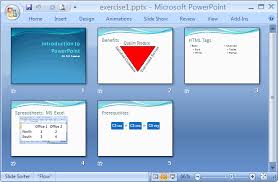
    PowerPoint helps you to make a slideshow for people to look at and it helps them understand the particular concept easily. Preparing an excellent presentation from PowerPoint takes some time, but after doing a little experimentation, you can get a different and successful presentation.
    The steps for creating a presentation in Microsoft Office PowerPoint:

    John Smith 發表在 痞客邦 留言(0) 人氣()

    undefined
    "There is a Problem Connecting Securely to this Website" Error signifies that there is a problem with the site's security certificate (SSL). However, this issue mainly affects Internet Explorer or MS Edge users, and this same error can be encountered with different message Wording on Google Chrome, Safari, and Firefox:
    Your Connection is Not Secure.
    Your Connection is not private.
    Safari can't establish a secure connection.

    John Smith 發表在 痞客邦 留言(0) 人氣()

    undefined
    After a succession of preview versions, finally, Microsoft came out with an official version of Office 2019. However, it is a stable version, which means that you can easily download, install and activate and use it right now without even worrying about any fatal errors which you found in the beta versions earlier.Since Microsoft Office 2019 only works on Windows 10, if you are using any previous version then you will be unable to install it.
    Microsoft Office 2019 is available to purchase and download for those who don’t want any rolling subscription to Office 365. Instead, you have to pay just once for Office 2019, and then after you can keep it forever.

    John Smith 發表在 痞客邦 留言(0) 人氣()

    When I think about the New Year’s Eve magnificent celebration, then a few things directly cling to my mind like over-night parties, toasts, champagne, group photos and more. You can celebrate this New Year’s Eve with splendid iPhone apps which can capture your every moment from planning party, making toast, to picking the best drinks for festivities.
     

    John Smith 發表在 痞客邦 留言(0) 人氣()

    Blog Stats
    ⚠️

    成人內容提醒

    本部落格內容僅限年滿十八歲者瀏覽。
    若您未滿十八歲,請立即離開。

    已滿十八歲者,亦請勿將內容提供給未成年人士。